
This case study is best viewed on desktop.If you're wondering why...let's just say I'm prioritizing other things.If you're on your phone seeing this, respectfully, leave now before you burn your eyes.Making Saves More Actionable on Google Maps
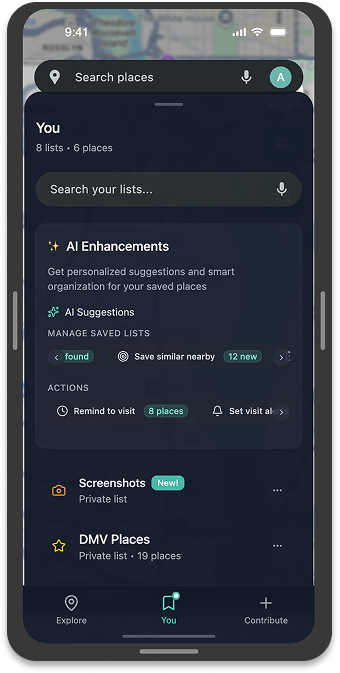
Designed and prototyped an AI assistant that makes Google Maps’ saved lists organized, personalized, and actionable
Company
ELVTR Capstone Project
Year
2025
Role
AI Product Designer
Tools
Figma, Figma Make, ChatGPT, NanoBanana, Google Maps MCP
Platform
Mobile
Timeframe
1 month
Category
Enterprise, Consumer
Focus
AI workflows, User Research, UX/UI Design, Rapid Prototyping
The next few sections will be summaries of the pages in the slide deck.
Process
AI Usage in the Design Process
AI tools, specifically ChatGPT, were used extensively throughout the project, from initial brainstorming to simulating user research.
Ideation & Brainstorming (The WISER Method): You used ChatGPT to act as a seasoned product designer from the Google Maps Saved Feature team to gain a concise, robust overview of existing research and limitations.
Top 5 Everyday User Issues with "Saved": The AI identified key pain points, including no proximity reminders for "Want to go" places, weak organization at scale, export pain, cross-platform inconsistencies, and collaboration clarity issues.
High-Value AI Concepts to Validate: Suggested AI research areas included smart organization (AI-generated tags, duplicate detection), contextual nudges (geofenced, opt-in reminders), natural-language curation, and trust & control mechanisms.
Simulating Early Research: The WISER method successfully simulated early user research, synthesizing user needs as "Wants quick retrieval, contextual reminders, no manual tagging". The AI also helped draft the research statement and interview guide.
Solution, Objectives, Success Metrics
Ideation & Brainstorming (The WISER Method): You used ChatGPT to act as a seasoned product designer from the Google Maps Saved Feature team to gain a concise, robust overview of existing research and limitations.
Top 5 Everyday User Issues with "Saved": The AI identified key pain points, including no proximity reminders for "Want to go" places, weak organization at scale, export pain, cross-platform inconsistencies, and collaboration clarity issues.
High-Value AI Concepts to Validate: Suggested AI research areas included smart organization (AI-generated tags, duplicate detection), contextual nudges (geofenced, opt-in reminders), natural-language curation, and trust & control mechanisms.
Prototype & Testing
Testing Tools:
Maze for real human participant feedback (where they got stuck, frustrations)
Snap by Versive with AI personas to simulate edge cases and surface systemic design issues (technical jargon, confusing hierarchy).
Key Findings: Both methods revealed that core tasks consistently failed, with human testers exposing broken functionality (map not loading, search unresponsive) and AI personas surfacing systemic design flaws (AI Suggestions feature never loaded, technical jargon in UI).
Top 4 Fixes Implemented:
Resolve Critical Functionality Failures.
Improve the Loading Experience.
Simplify and Clarify Language in the UI (Quick Win).
Show Users Their Saved Places by Default (Quick Win).